AI CLI Usage
Tested
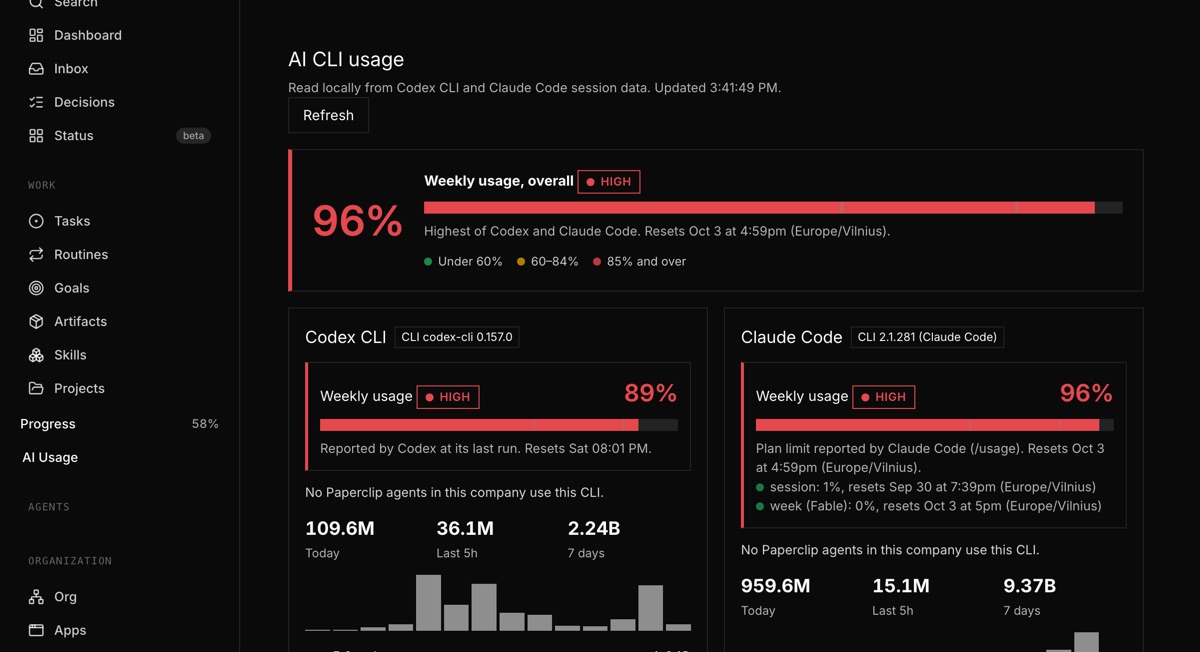
Check usage in a dashboard widget or open the AI Usage page from the sidebar. The plugin reads local CLI session logs. It shows weekly usage percentages, green, yellow and red status, and an overall figure. See token totals for today, the last 5 hours and the last 7 days. View totals by model and the Paperclip agents that use each CLI.
eimkasp/paperclip-plugin-ai-usagev0.2.0GitHub stars: 0Updated
We built this one.
How we tested it
We run it on our own Paperclip with real Codex CLI and Claude Code logs. The first load can take about 15 seconds while it reads them.
Testing details
Version 0.2.0, checked on 30 Sep 2026 with Codex CLI 0.157.0 and Claude Code 2.1.281.
What it does
- Weekly usage percentage per CLI and overall, with green, yellow and red status
- Codex weekly limit as reported by Codex; Claude Code plan limit from its own /usage report
- Tokens today, last 5 hours and 7 days per CLI
- Paperclip agents that use each CLI
- Per-model totals and a 14-day chart
- CLI installed check via --version
Install
Not on npm yet, so you’ll install it from source.
Requires Paperclip 2026.831.1+ · Node 20+.
git clone https://github.com/eimkasp/paperclip-plugin-ai-usage.git
cd paperclip-plugin-ai-usage
npm install
npm run build- Clone and build the plugin.
- In Paperclip, open Settings → Plugins and install from the checkout path.
- Confirm the plugin reaches ready status and review its capabilities.
Reviews
No reviews yet. Tried it? Tell others how it went.