Office
Docs reviewedWe read the code and docs, but haven’t run it ourselves.
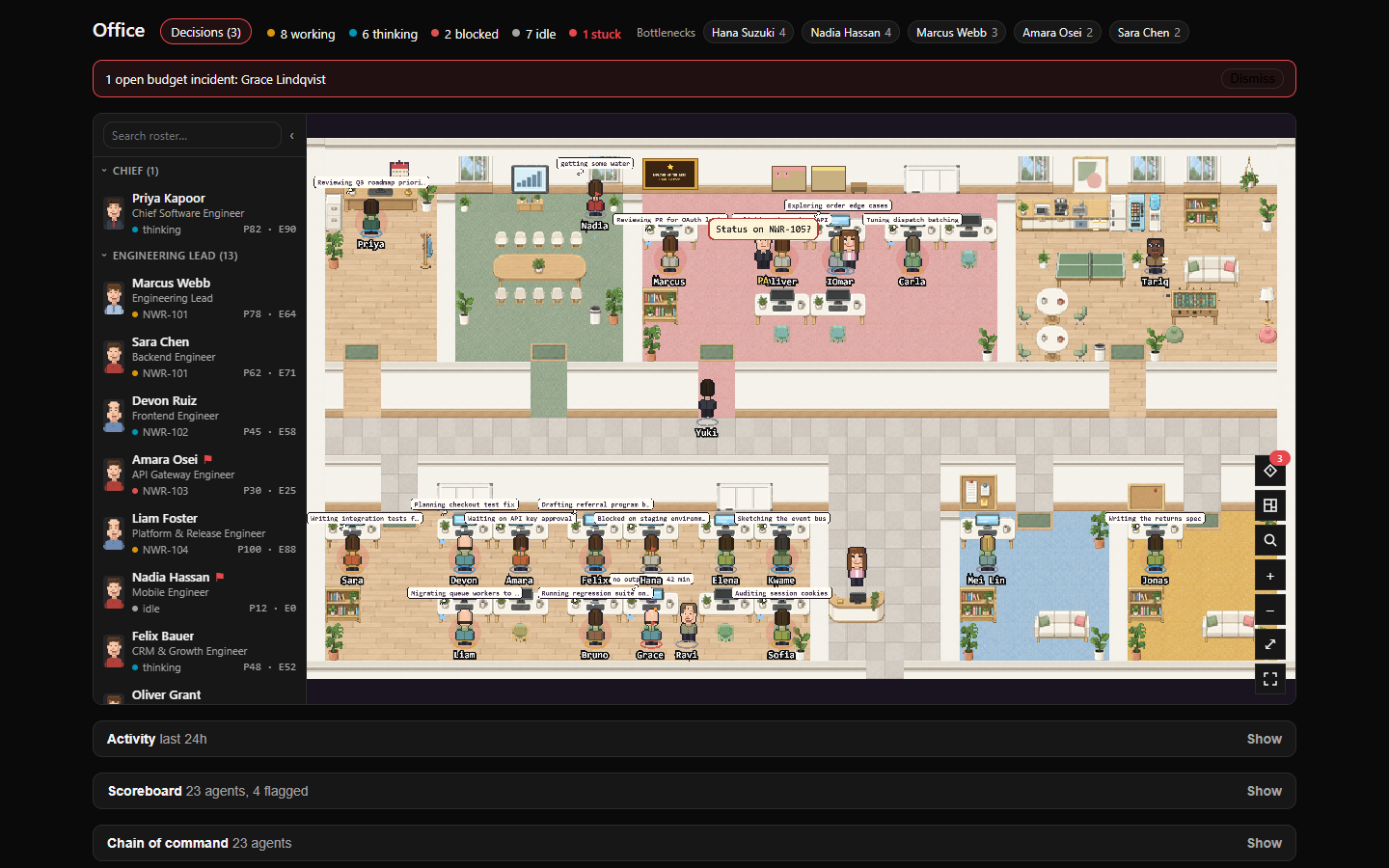
Draw a company as a pixel office generated from its org chart, with each agent’s state, current issue and handoffs on the floor. A Decision box gathers pending approvals and decision cards with Accept and Reject buttons. Scores, a bottleneck heatmap, cost views, a dashboard widget and two agent tools are included.
Kshitijm7/paperclip-officev0.1.2GitHub stars: 12Updated npm 123/mo downloads
Our take
It does more than display. The Decision box answers approvals, and the built-in assistant is on by default: it comments every 30 minutes on an issue assigned to your top agent and can wake that agent. Check its settings after you install.
Based on the repo as of . Read the README (opens in a new tab)
What it does
- Org-chart floor plan with live agent states and handoffs
- Decision box for approvals and decision cards
- Scores, heatmap, cost views and a reporting PA
Install
Requires Node.js 20+.
- Install the npm package on your Paperclip instance.
- Open a company and choose Office in the sidebar.
- Review the PA, PA reports and Decision box settings in Settings → Plugins → Office before leaving it running.
npx paperclipai plugin install paperclip-officeReviews
No reviews yet. Tried it? Tell others how it went.