What’s new in Paperclip: October 2026 updates
Paperclip shipped four releases in October. Here’s what changed, what it looks like and what to check before you upgrade.
We ran two of the releases with a made-up company and took the screenshots below. Everything else comes from the release notes, and each point links to its source.
| Release | Headline |
|---|---|
| v2026.1001.0 (opens in a new tab) | Reliability work, agent faces, a rebuilt Slack setup and pull request review bots |
| v2026.1005.0 (opens in a new tab) | Grok Build, persistent agent files, skills from GitHub and Browser Use Cloud |
| v2026.1012.0 (opens in a new tab) | Outside assistants over MCP, Chat-first navigation and new models |
| v2026.1023.0 (opens in a new tab) | Private work, your own model gateway, self-setup Slack bots and exact costs |
Private tasks and projects
You can now make a task or a project private. Only the people and agents you name can open it, find it in lists and search, or read its runs (#14717, #10633).
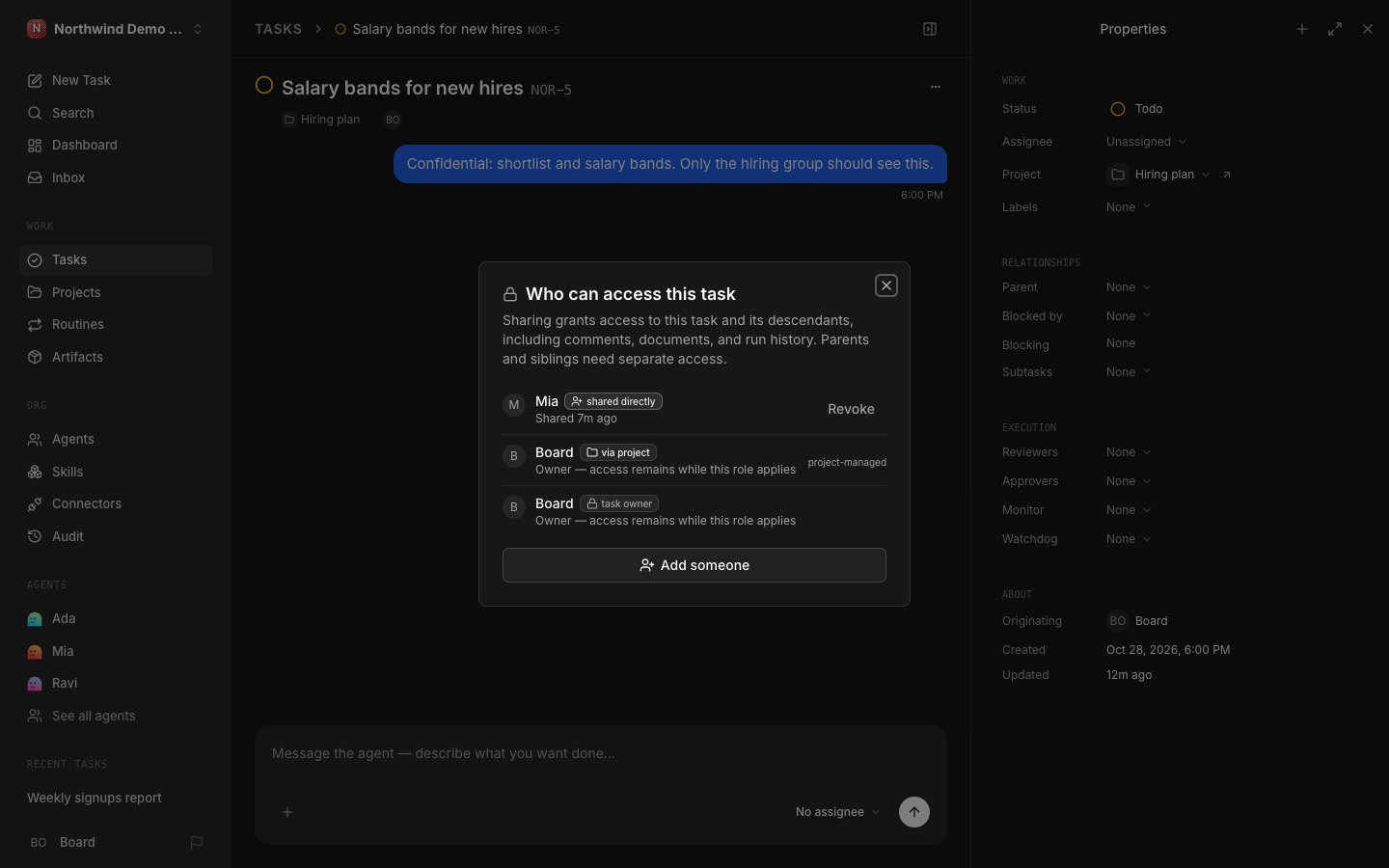
Access flows down to subtasks, never up. Sharing a subtask doesn’t reveal its parent or its siblings (#14717).
Owners and admins don’t see private tasks by default. An emergency read needs ?breakGlass=true, which is logged and flagged on the task (#10633).
Dashboard totals and the company run list still count private work, without the title. That keeps budget checks working (#14717).
Reports you can open on the task
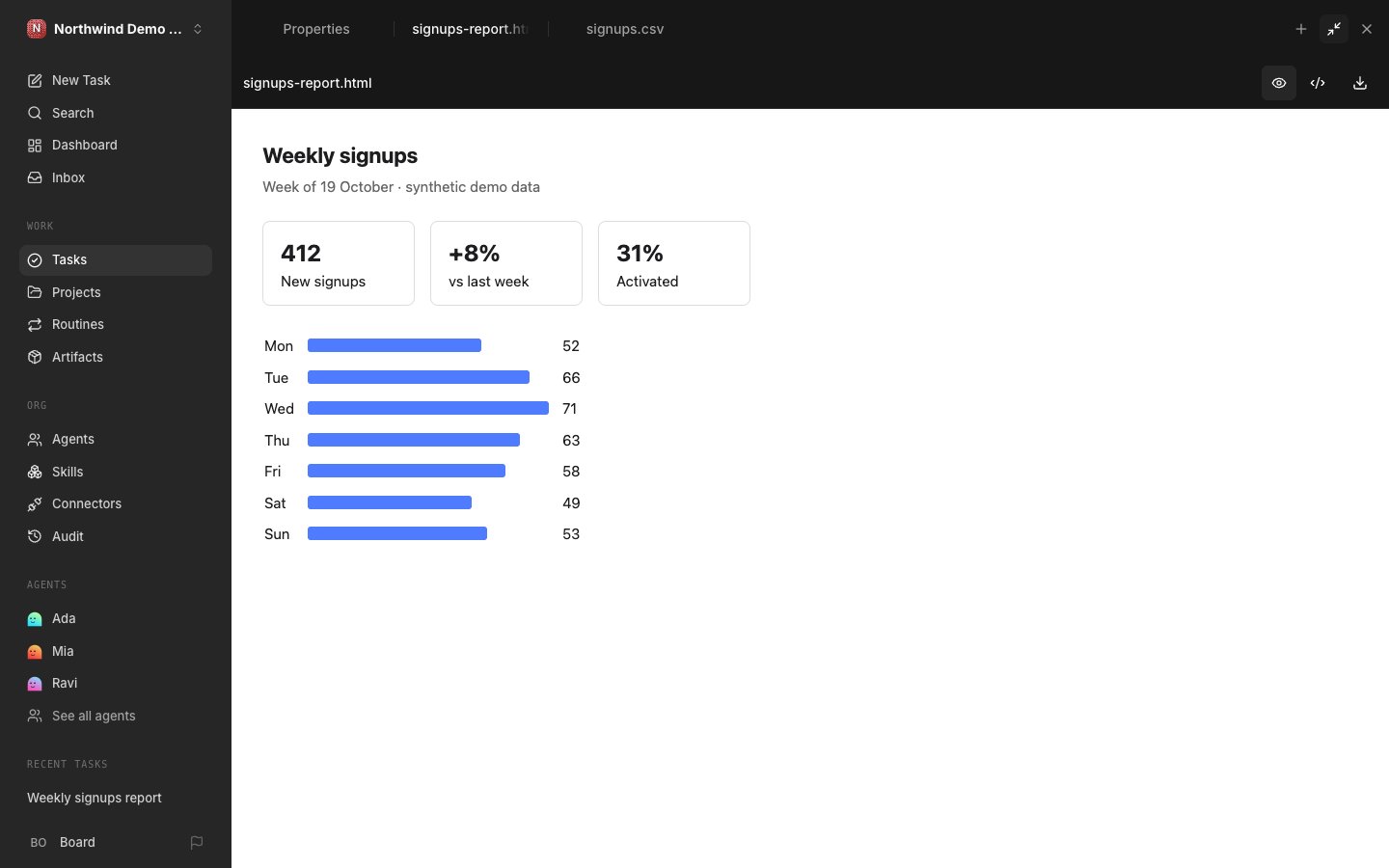
When an agent attaches an HTML report, Paperclip now renders it on the task. It runs in a locked-down sandbox, with buttons to view the source or download the file (#15447).
CSV files open as a table with row numbers, a sticky header and a record count (#15445).
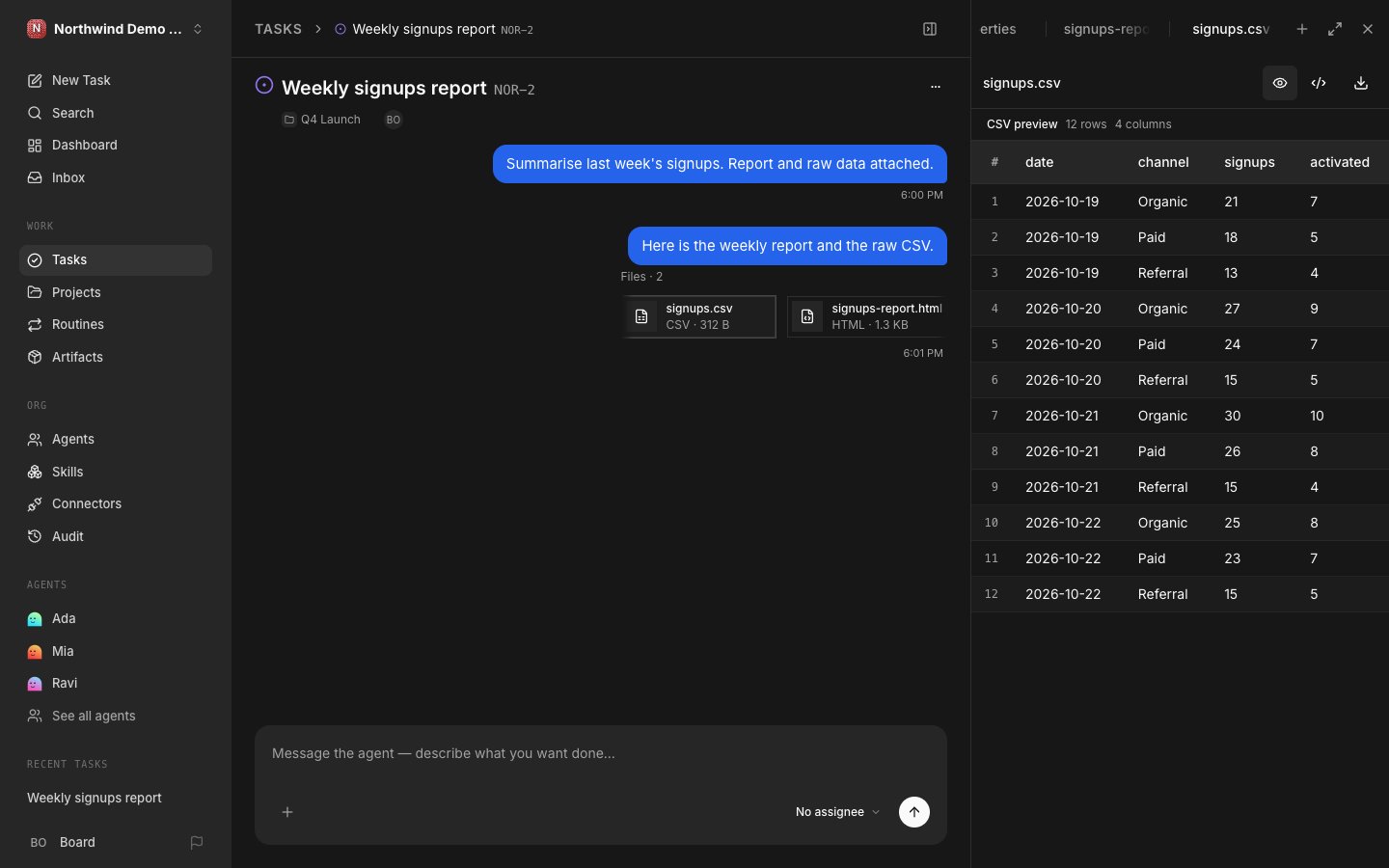
Reports have to be self-contained. Remote files, API calls, forms and pop-ups are blocked (#15447). The table shows up to 500 rows and 100 columns, and the download keeps the whole file (#15445).
A costs ledger you can reconcile
Costs is now an exact ledger. Each charge is marked reported, estimated or unpriced, instead of quietly showing zero (#14991, #14997).
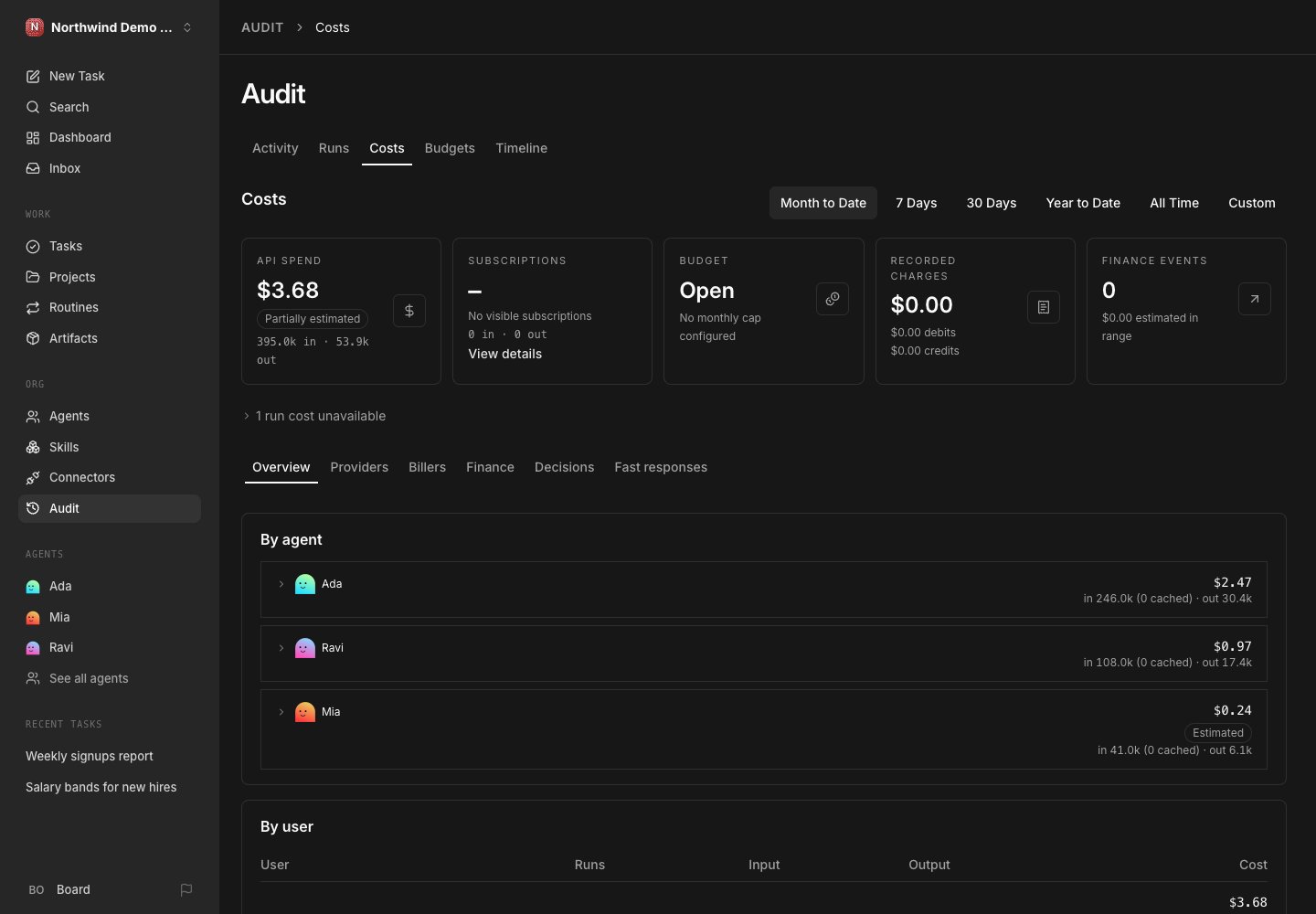
Connected ChatGPT or Claude subscriptions show their monthly fee once, beside API spend, and you can enter the real price (#15634). Our demo has no subscription connected, so that card is empty.
Budgets now hold on unpriced usage by default. If Paperclip can’t price your provider, set the budget policy to allow or resolve those charges (#14997).
Bring your own model gateway
Connectors now lists OpenRouter, Amazon Bedrock and Google Gemini, plus generic Responses, Messages and Chat Completions endpoints (#14970, #15341).
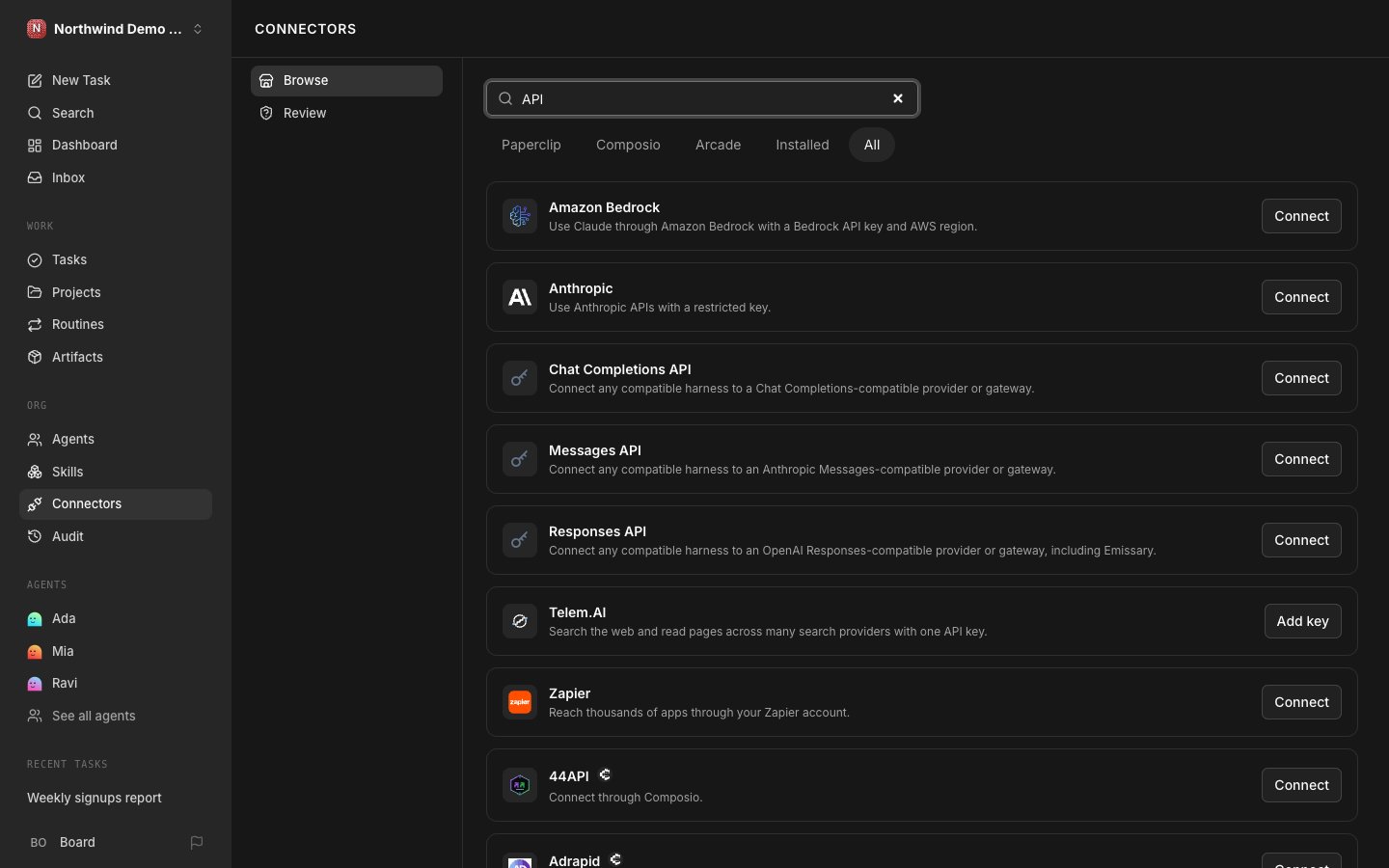
You save the URL and key on the connection, then pick it on the agent’s Harness / Runtime page.
Codex can use OpenRouter or a Responses endpoint. Claude can use OpenRouter, a Messages endpoint or Bedrock. OpenCode and Hermes can use OpenRouter or Chat Completions (#14970).
We didn’t add a key or run an agent through a gateway.
Agents with a lifecycle
Hiring, approval, pause, resume and termination now move through explicit states. The agent page shows the current step and offers Retry (#15631, #15391).
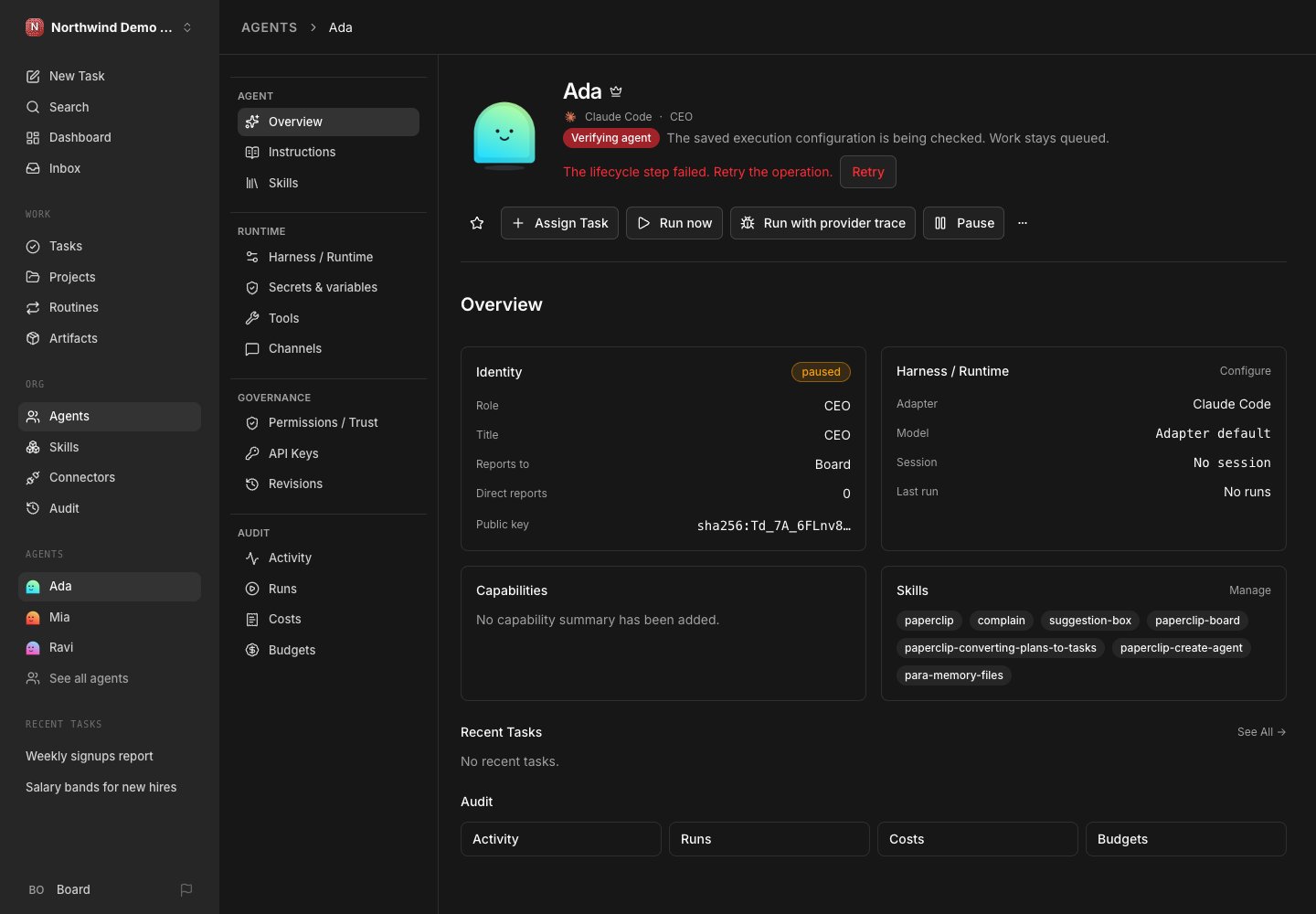
Our demo agents use Claude Code and Codex with no login, so verification failed. That’s the screen you’ll see when a harness isn’t set up. An agent on the process adapter passed and went to Ready.
The crown marks your primary agent, the fallback for new tasks and Chat (#15470). Each agent also gets its own Ed25519 key pair, with the public key on its overview (#15352).
Slack bots that set themselves up
New Slack bots default to automatic setup. You paste a temporary App configuration token, and Paperclip creates the app through Slack’s Manifest API, then installs it (#15413).
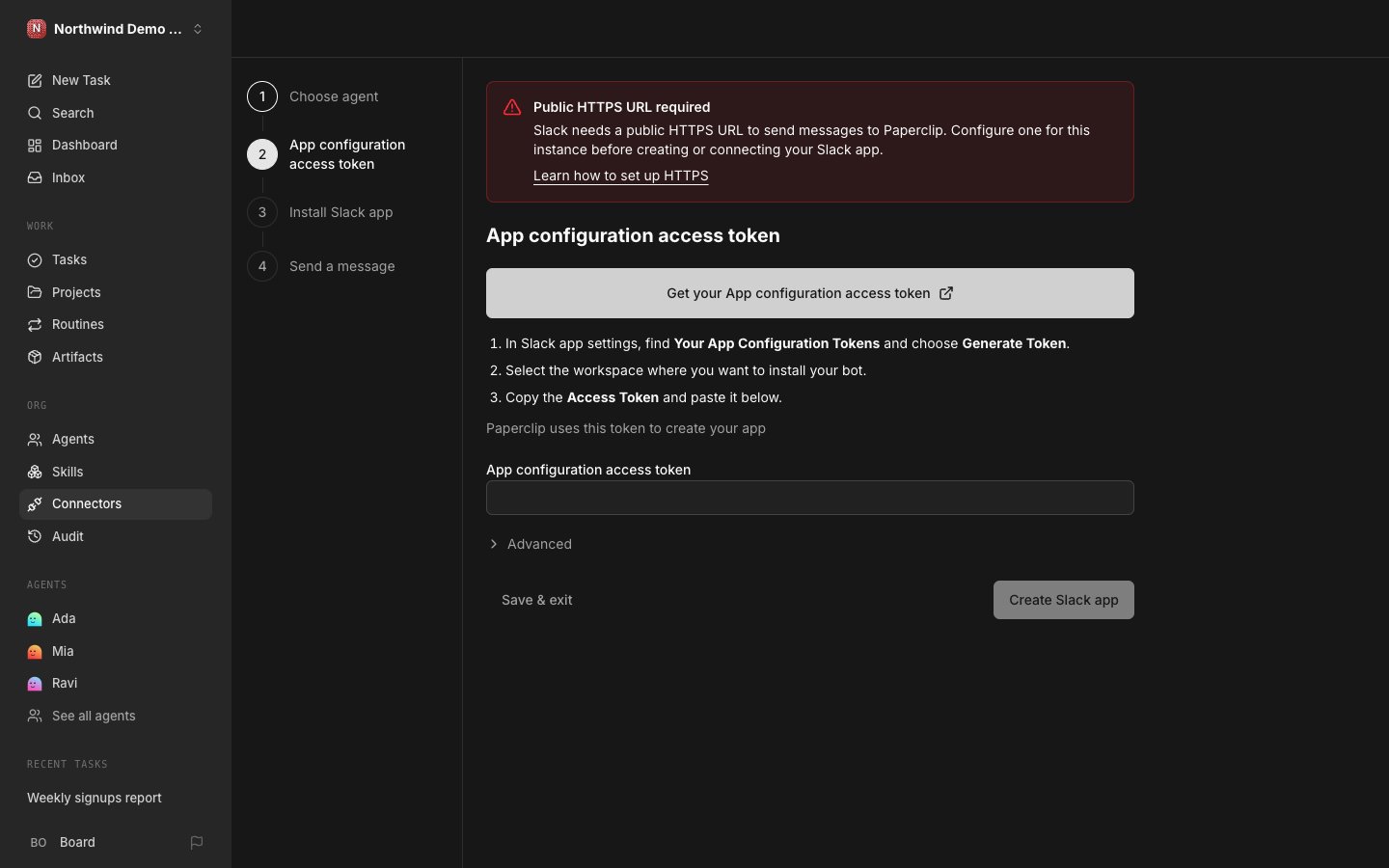
We stopped at step two and didn’t enter a token. On our instance, the chat option only appeared after we turned on Settings → Experimental → Chat connectors. Slack also needs a public HTTPS address, which a local test instance doesn’t have.
A new Require at-mention setting stops thread replies from waking the agent unless someone mentions it (#15612).
Skills synced from GitHub
Skills has a Sources tab. Point it at a GitHub repository, choose the skill folders and refresh when you’re ready (#14713).
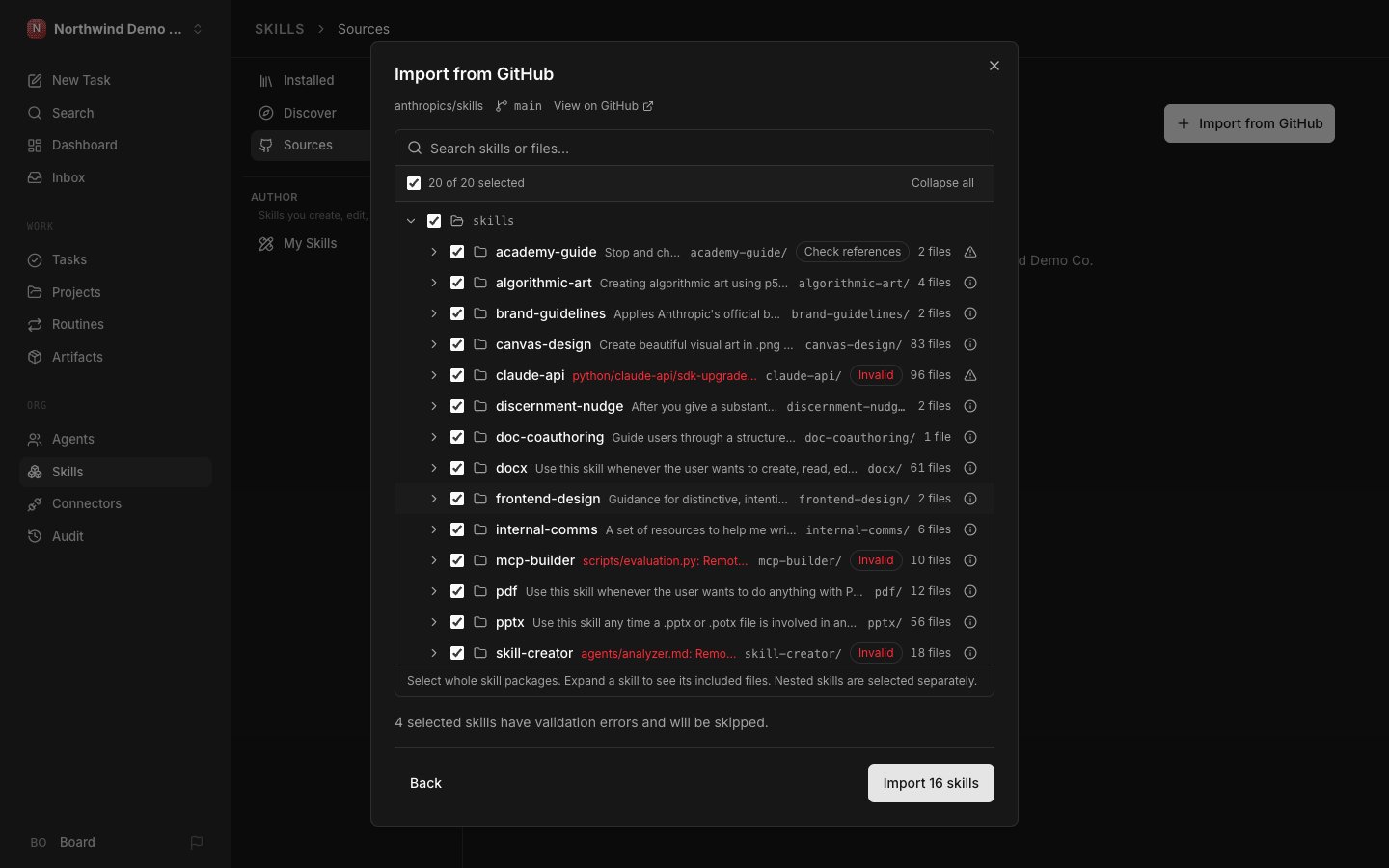
Agents use the installed copy, so they never fetch from GitHub mid-run. A failed refresh keeps the last good version.
We pointed it at the public anthropics/skills (opens in a new tab) repository. Paperclip found 20 skills and flagged 4 it would skip. We didn’t run the import.
Outside assistants on your team
Claude Code, Codex, OpenCode and other MCP clients can connect to Paperclip as you. They can search tasks, delegate work and leave comments (#14846).
From v2026.1023.0 they can also edit and finish tasks, upload files and, with separate consent, configure agents (#15380).
It’s off by default, behind Settings → Experimental → Assistant connections (MCP), and it needs an HTTPS PAPERCLIP_PUBLIC_URL (#14933). We saw the connector card but didn’t connect an assistant.
Also new in October
- v2026.1001.0 (opens in a new tab): agents get persona faces across the app (#13171), and routines get webhook triggers with test deliveries (#13637).
- v2026.1005.0 (opens in a new tab): Browser Use Cloud lets you watch and take over an agent’s browser from the task (#14627). Grok Build runs on the native runner (#13882), and the composer picks model and effort per message (#14322).
- v2026.1012.0 (opens in a new tab): Chat leads the navigation when Agent Chat is on (#15100). Claude Sonnet 5.5 and GPT-6.1 Sol arrive (#14993, #14942), and the default CEO instructions shrink from about 1,900 words to 20 (#14985).
- v2026.1023.0 (opens in a new tab): sixteen more apps join Connectors, including Calendly, Exa, Context7 and Hugging Face (#15621, #15686). A follow-up task now shows which task and agent created it (#15762).
Before you upgrade
Every October release has breaking changes. Read the ones between your version and the target.
- v2026.1001.0 (opens in a new tab): harnesses now default to full auto, so set an explicit mode on agents that must keep provider approval gates (#13686). Legacy Composio connections stop working, with no automatic migration (#13758).
- v2026.1005.0 (opens in a new tab):
PAPERCLIP_CLOUD_UI_SNIPPETis gone, so move that HTML into a plugin (#13789). Mentioning an agent no longer starts a run; assign it or request a review instead (#14577). - v2026.1012.0 (opens in a new tab): stop every old server and worker before you upgrade, because restore locks changed (#14869). Tool grants are enforced as written, so check custom grants (#14915).
- v2026.1023.0 (opens in a new tab): the Operator role gains fourteen grants, including agent and connection setup (#15377). Budgets hold on unpriced usage (#14997), and GitHub review bots move behind an experimental setting (#15416).
What it means for plugin authors
- v2026.1001.0 (opens in a new tab): plugins can load image catalogs, and Paperclip checks each one before any plugin code runs (#13646).
- v2026.1005.0 (opens in a new tab): plugins can supply an organization switcher (#13832). With snippet injection gone, a plugin UI contribution is the supported way to add HTML (#13789).
- v2026.1012.0 (opens in a new tab): Paperclip keeps a journal of agent and project events (#15280, #15306).
- v2026.1023.0 (opens in a new tab): plugins can read that journal with acknowledgments (#15343, #15371), and required plugins get a callback at each agent lifecycle step (#15631). Plugins see no private content (#10633).
If your plugin reads tasks, test it against a private task. A dashboard or sync tool will show fewer items than before.
Building your first plugin? Start with our plugin tutorial. For plugins released in October, see the October roundup.
How we tested
We installed paperclipai 2026.1023.0 and 2026.1005.0 from npm. Each ran with its own data folder, port and home directory, apart from our everyday Paperclip.
Both held one made-up company, Northwind Demo Co. We created its tasks, files and cost entries through the API, and clicked through the sharing and setup screens.
We didn’t run an agent, connect an account or enter a key or token. We didn’t install v2026.1001.0 or v2026.1012.0. Points without a screenshot come from the release notes.
We took the screenshots on 28 October and rechecked the release notes on 2 November. No newer stable release had shipped by then.