17 new Paperclip plugins from October 2026
October brought more than 40 new Paperclip plugin repos on GitHub. We read through them and added 17 to the directory.
For each one you get what it does and the one thing to know before you install it. We read the code and docs, but we haven’t run these ourselves.
What changed in Paperclip
Paperclip shipped four releases this month. If you build or run plugins, these are the changes to know:
- v2026.1001.0 (opens in a new tab): plugins can load image catalogs. Paperclip checks each catalog before it runs any plugin code.
- v2026.1005.0 (opens in a new tab):
PAPERCLIP_CLOUD_UI_SNIPPETis gone. If you used it to inject HTML, move that to a plugin before you upgrade. Plugins can now add an organization switcher too. - v2026.1012.0 (opens in a new tab): Paperclip starts keeping a journal of agent and project events, the groundwork for plugin hooks.
- v2026.1023.0 (opens in a new tab): tasks and projects can be private, and plugins can’t see them. Plugins can also react when an agent is hired, paused or stopped.
After you upgrade to v2026.1023.0, test any plugin that reads tasks against a private task. A dashboard or sync tool may now show fewer items than before. For screenshots and the full upgrade list, read What’s new in Paperclip.
Self-hosted chat, Git and storage
Five plugins connect Paperclip to tools you run on your own servers.
Matrix Chat Bridge
Chat with your Paperclip agents in Matrix rooms and DMs. Each agent gets its own bot account.
You’ll need a Matrix homeserver and one Matrix account per agent. Anyone in a bridged room can prompt the agent, and an empty allowlist bridges every room the bot joins, so set the allowlist first.
Gitea
Turn Gitea issues and pull requests into linked Paperclip issues. Each agent calls Gitea as its own bot account.
Sync runs one way, from Gitea into Paperclip, and you add the webhook to each repository yourself. The agent tool can make any Gitea API call the bot token allows, including deletes, so keep the token’s scope tight.
Forgejo
Check your Forgejo connection and link its repositories to Paperclip projects. A Forgejo tab on each project lists your repositories and marks the ones already linked.
This first release is read-only. Agents can’t open pull requests or read issues yet, and you run the workspace command yourself. package.json says MIT, but the repo has no LICENSE file.
Nextcloud identity
Give each agent its own Nextcloud account, mailbox and MCP connection. It onboards an agent like a new hire, and it’s the first listing to use Paperclip’s new agent lifecycle hook.
You run the whole stack yourself: the project’s server, Nextcloud with Mail and Talk, a mail server and an MCP server. Purging an identity deletes the agent’s files and mailbox. While the plugin is on, deleting an agent waits until its identity is purged.
OpenShell Sandbox Provider
Run Paperclip sandbox environments on NVIDIA OpenShell. It’s a community driver for Paperclip’s sandbox provider plugins.
You need the openshell CLI on the Paperclip server, with an authenticated gateway and a ready template or image. Policies and credentials live in OpenShell, not in this plugin. The maintainer says live testing of the optional duplex bridge isn’t finished.
View listing: OpenShell Sandbox ProviderSource (opens in a new tab)
Company views and pixel-art offices
New ways to see what your agents are doing, across one company or all of them.
Boardroom
Put several agents in one discussion, run it in rounds and record the decision. You choose who speaks each round, and the outcome becomes follow-up issues.
Each turn is a normal agent run with that agent’s usual permissions; Boardroom doesn’t limit them. The maintainer tested it with claude_local and grok_local on Paperclip 2026.1005.0, so other adapters are untested.
Routines Calendar
See when your routines are scheduled to run, by month, week or day. Handy for spotting five agents all firing at the same minute.
It only reads data: the page loads routines through the Paperclip API with your session. The maintainer calls it early development.
Board global
See issues and dashboards from every company on one board. Useful if you run several companies on one instance.
The interface is in Spanish. Dragging a card changes the issue’s status, and saved views are shared with everyone on the instance.
Office
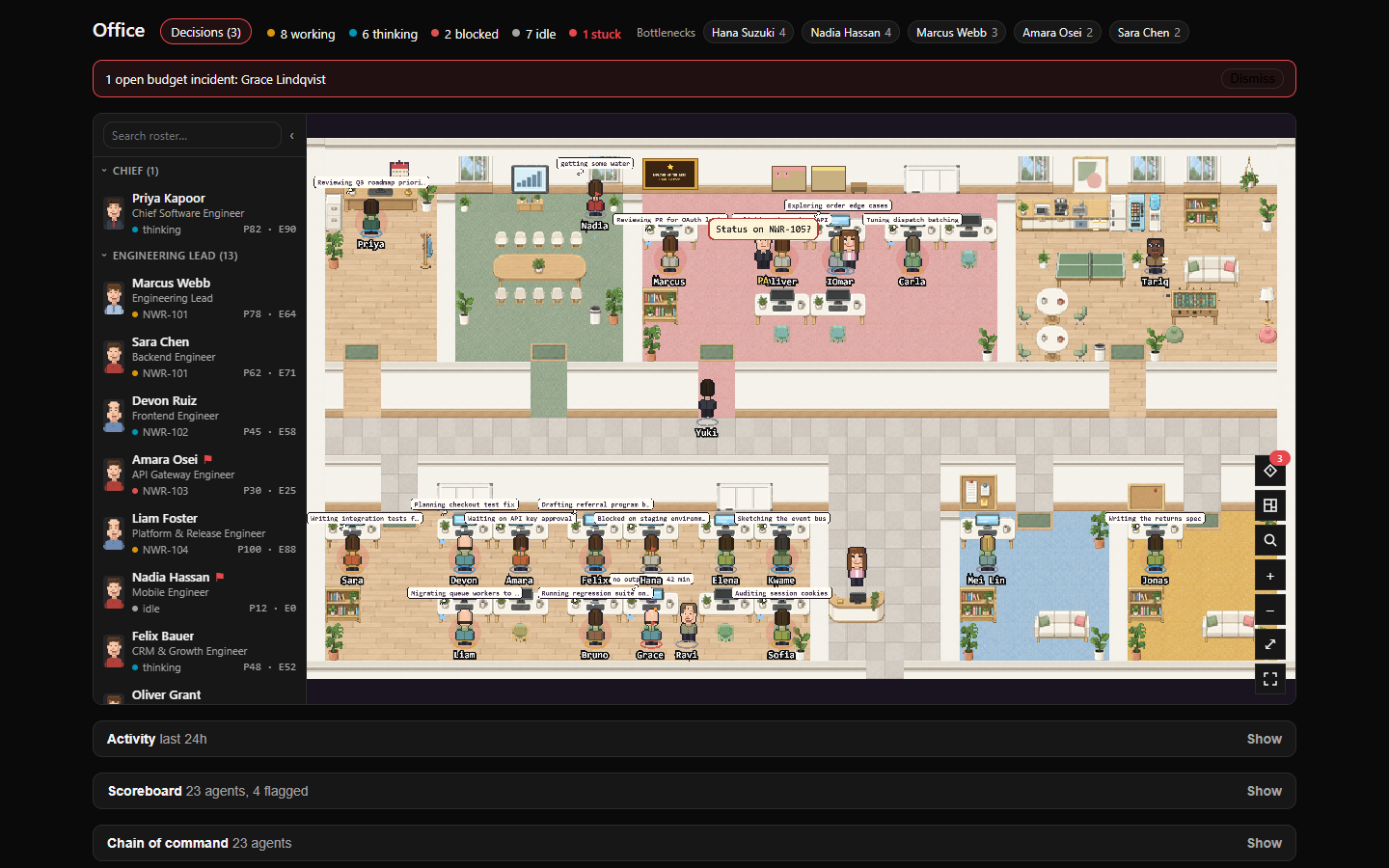
Watch your agents in a pixel-art office and answer what they’re waiting on. Its Decision box lets you accept or reject what agents are waiting on.
It does more than display. The Decision box answers approvals, and the built-in assistant is on by default: it comments every 30 minutes on an issue assigned to your top agent and can wake that agent. Check its settings after you install.
Oficina global
See agents from every company in a pixel-art office and answer them there. Agents line up at your desk when they need you, and it can read notifications aloud.
The interface and voices are in Spanish, and answers go out with your session. If you turn on the Edge voices, notification text is sent to Microsoft.
Agent budgets, costs and safety checks
Know what agents cost, and check a new hire before you approve it.
Advanced Budgeting
Set monthly budgets per project for API spend and subscription plans. API spend and flat-fee plans get separate budgets, which helps if you mix metered keys with Claude or ChatGPT plans.
Budgets are advisory. It never pauses work, and alerts stay inside the plugin. Usage without a recorded cost is priced at list rates, and uninstalling with --force deletes your budgets and history.
Agent Ledger
See each agent’s models, token use and estimated cost, rolled up the org chart. It also flags agents running a different model from the one they were set up with.
It isn’t read-only: board members can start runs for up to ten agents and change an agent’s model from the table. Costs are list-price estimates, not invoices.
BotArmor Gate
Audit a new agent’s instructions before you approve the hire. You get a grade and suggested fixes as an issue comment.
You need a BotArmor account. Each audit uses a paid credit and sends the agent’s instructions to BotArmor. The vendor calls results a simulated estimate, and the plugin reports without blocking hires.
Connectors for n8n, Sanity and Instantly
Let agents work in the tools your team already uses.
n8n
Let agents run n8n workflows, and let n8n open issues in Paperclip. It works both ways: agents trigger workflows, and workflows comment back.
You need an n8n instance with its API turned on, and agents can only run workflows that start from a Webhook trigger. A local or Docker n8n needs private-network access for that company, which skips Paperclip’s HTTP guard.
Sanity
Let agents query, draft and publish content in Sanity. It’s the first CMS connector in the directory.
The Sanity token sets the limits: with an Editor token, agents can also delete and publish documents. Webhooks need Sanity to reach your server, and the polling fallback misses deletions and draft-only edits.
Instantly
Let agents work your Instantly campaigns and turn lead replies into issues. Three tools cover the whole API instead of one tool per endpoint.
The API key’s scopes are the real limit. A write-scoped key lets agents add leads, change campaigns and send replies from your inboxes. Deletes and paid orders stay blocked until you turn them on.
Fan-out
Run one skill over many items from a single primed Claude Code session. The session forks once per item, so the agent doesn’t repeat its full context each time.
You need the Claude Code CLI signed in on the Paperclip server, and every item uses your Claude usage. It’s set up for one company per instance, and failed items aren’t retried, so use write tools that are safe to repeat.
Plugins we skipped for now
These showed up in October too. Most aren’t on npm yet or need a closer look. We’ll revisit them.
- Linear Todo Intake (opens in a new tab): imports Linear tickets that reach Todo into a separate governance plugin. The README has no operator install guide yet, and the maintainer says operational launch is still disabled.
- Pixel Guild (opens in a new tab): a pixel-art office you walk around in. It still uses the starter template’s example name and builds against an SDK version that isn’t on npm.
- TogetherWeOwn plugins (opens in a new tab): one organisation published six plugins this month, including a PR tracker, a decision router and a boat.dev sandbox provider. None was on npm when we checked.
- WhatsApp via Evolution API (opens in a new tab): two-way WhatsApp conversations through a self-hosted Evolution API. It wasn’t on npm when we checked, and its interface and agent instructions are in Polish.
- Text-to-speech (opens in a new tab): adds a play button to issues and comments. It wasn’t on npm when we checked.
- scottgl9’s Matrix and Forgejo plugins (opens in a new tab): another Matrix plugin and another Forgejo plugin, both created on 16 October. Neither was on npm when we checked.
- Paperclip Vault and Security Hardening (opens in a new tab): a credential vault and a sandbox-hardening watchdog. Both pair a plugin with a root-level host installer, which needs a closer review.
- GitLab sync (opens in a new tab): a GitLab port of a GitHub plugin. Its package name and README still describe the GitHub original.
- Bitwarden Secrets Manager (opens in a new tab): mirrors Bitwarden secrets into Paperclip. Its package is marked UNLICENSED, so we can’t list it.
How we chose
We searched GitHub and npm for plugins created between 1 and 27 October, and checked new submissions to Awesome Paperclip (opens in a new tab). To make the list, a plugin needed public source, a licence, a real Paperclip manifest and install steps. If it’s on npm, the package had to match the repo.
Built one we missed? Submit it. To catch next month’s plugins, follow the RSS feed or see what’s new.