Top 10 Paperclip extensions to explore in 2026
Ten real Paperclip extensions reviewed by use case, with source links, installation routes, and practical limitations.
These are editorial picks ordered by practical use case, not popularity or benchmark scores. We reviewed public repository documentation on 13 September 2026. We have not installed or tested these ten extensions. Our own Progress Reports plugin is excluded from the ranking.
1. Company Wizard
Builds companies from modular templates, roles, workflows and tasks.
A useful starting point when you want repeatable team setup instead of assembling every role manually. Review generated files before provisioning: this changes your company and launches an agent workflow.
How to install
Install @yesterday-ai/paperclip-plugin-company-wizard in Settings → Plugins.
View listing: Company WizardSource and install guide (opens in a new tab)
2. GitHub Issues Sync
No UI screenshot is published in the reviewed repository.
Links selected GitHub issues with Paperclip, syncs status and optionally bridges comments.
A strong fit when your backlog already lives on GitHub. Selective linking is more manageable than copying everything. Requires a GitHub token with appropriate issue permissions; webhook and polling configuration matter. The README says it was built before the plugin runtime shipped and had not yet been tested against a live Paperclip instance, so check host compatibility first.
How to install
Not published on npm. Build from source as described in the repository, then install it from the local path.
View listing: GitHub Issues SyncSource and install guide (opens in a new tab)
3. Linear
No UI screenshot is published in the reviewed repository.
Pushes and imports issues, mirrors comments and shows Linear references inside Paperclip.
Worth exploring for teams that coordinate in Linear. Team mappings and reconciliation jobs make it more than a notification bridge, but two-way writes need careful configuration. Requires Linear API access.
How to install
Repository documents a local source build and local-path installation.
View listing: LinearSource and install guide (opens in a new tab)
4. Paperclip Aperture
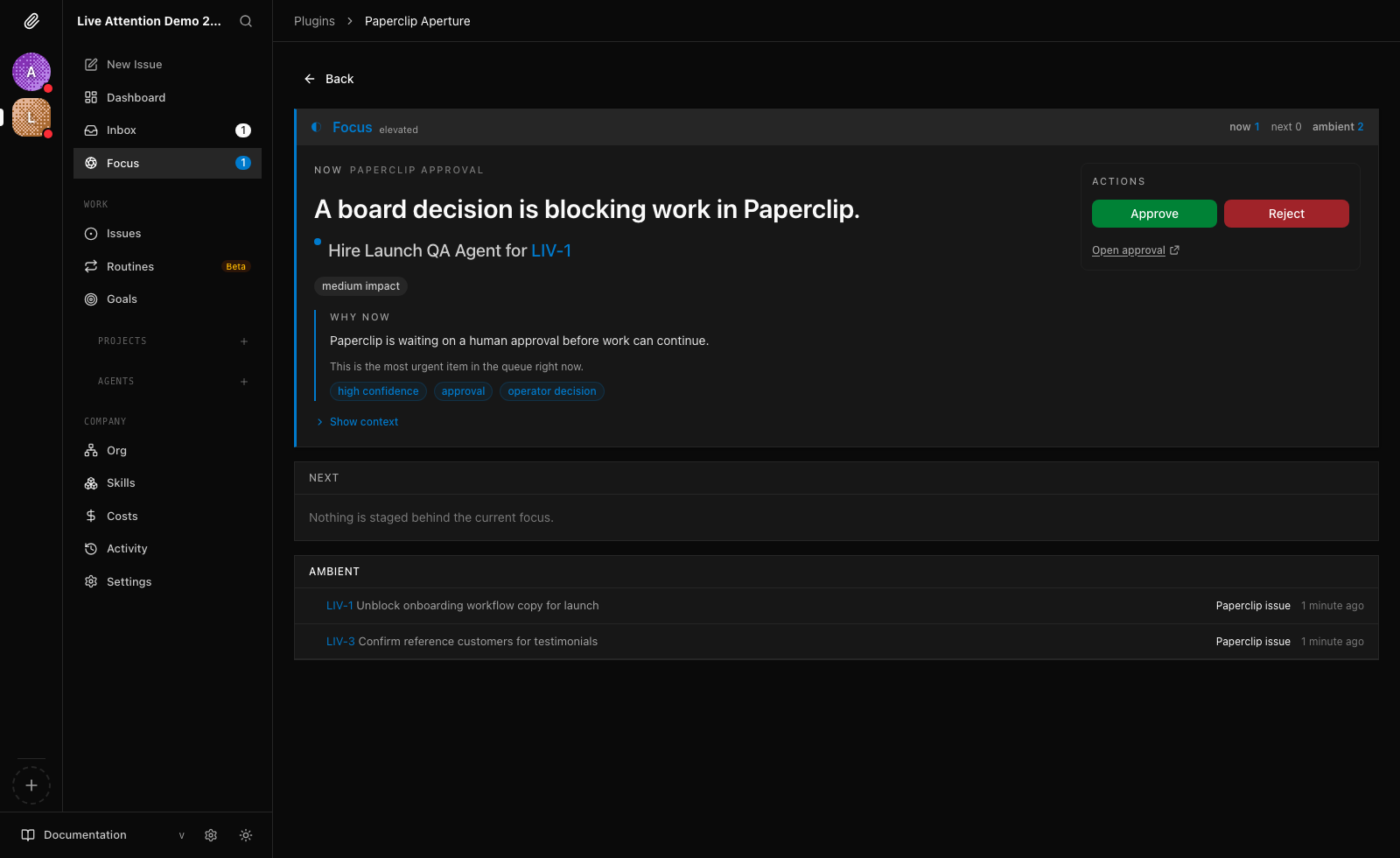
Adds a Focus surface that sorts approvals and activity into now, next and ambient.
Promising when operators need help deciding what deserves attention. Approval overlays are opt-in and need host API configuration; check the current minimum host version and installer notes.
How to install
npx paperclipai plugin install @tomismeta/paperclip-apertureView listing: Paperclip ApertureSource and install guide (opens in a new tab)
5. Slack Chat OS
No UI screenshot is published in the reviewed repository.
Brings notifications, approvals, commands and agent conversations into Slack.
A good match for Slack-first teams. Its command-center scope is broader than notifications, so decide which channels and actions you want before enabling everything. Setup requires a Slack app and company-scoped secrets.
How to install
Follow repository setup for paperclip-plugin-slack. Maintainer recommends Paperclip v2026.817.0 or newer for activation.
View listing: Slack Chat OSSource and install guide (opens in a new tab)
6. Telegram Bot
No UI screenshot is published in the reviewed repository.
Telegram notifications, bot commands, inline approvals and reply routing.
Useful for checking work from a phone. Interactive commands make bot access and company routing important. Review current host compatibility and bot configuration before connecting a real company.
How to install
Follow repository Install and Setup sections for paperclip-plugin-telegram.
View listing: Telegram BotSource and install guide (opens in a new tab)
7. Discord Bot
No UI screenshot is published in the reviewed repository.
Notifications, slash commands, interactive approvals and channel routing in Discord.
A natural option for teams already operating in Discord. Gateway support can help local deployments receive interactions, but bot permissions and channel-to-company mappings still need deliberate setup.
How to install
Use repository Install and Setup instructions for paperclip-plugin-discord.
View listing: Discord BotSource and install guide (opens in a new tab)
8. Obsidian Paperclip
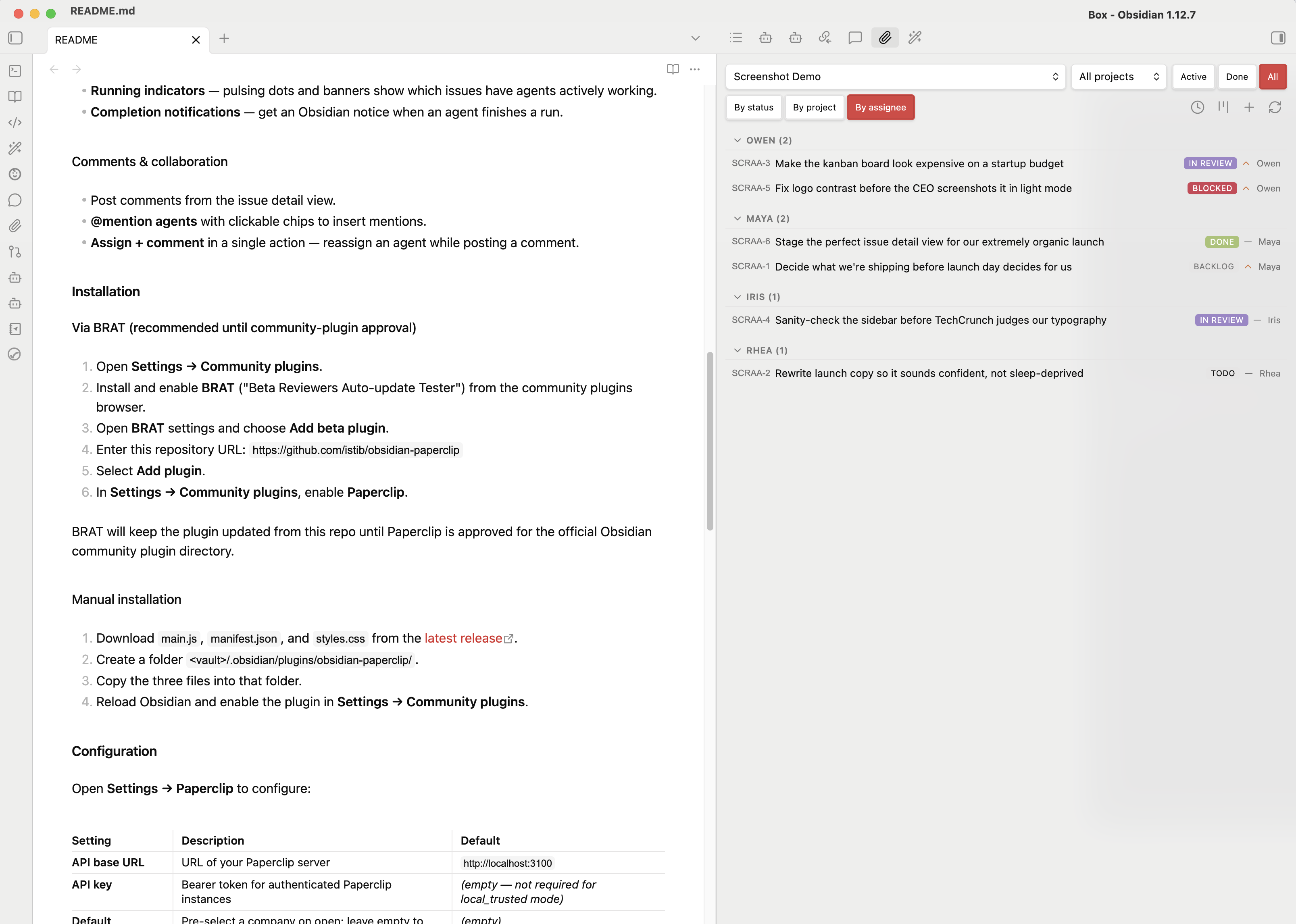
Issue browsing, comments, assignment and a kanban view inside Obsidian.
Especially useful if your notes are your main workspace. This installs in Obsidian, not the Paperclip plugin runtime. Optional AI actions send selected document content to your configured provider.
How to install
Install via BRAT using this repository, or copy release assets into your vault plugin folder.
View listing: Obsidian PaperclipSource and install guide (opens in a new tab)
9. Agent Analytics Live

A live traffic page, dashboard widget, sidebar entry and per-company settings.
A focused choice for website operators who already use Agent Analytics. This shows visitor traffic, not agent task-completion metrics. Requires an existing account with live-read access.
How to install
Install @agent-analytics/paperclip-live-analytics-plugin, then connect an account and select a project for each company.
View listing: Agent Analytics LiveSource and install guide (opens in a new tab)
10. Chat
No UI screenshot is published in the reviewed repository.
Conversational threads, slash commands and streamed responses through Paperclip agent sessions.
Interesting if you want conversational access inside Paperclip. It uses configured agents rather than calling models directly. Requires a compatible agent adapter; the README focuses on a source build rather than a verified npm install.
How to install
Follow repository Build instructions, then install and enable the built plugin in Paperclip.
View listing: ChatSource and install guide (opens in a new tab)
Which should you try first?
Start with the tool that connects to your existing workflow: GitHub or Linear for your backlog, Slack or Telegram for communication, Obsidian for notes. Choose Company Wizard for setup, Aperture for attention, or Agent Analytics for website traffic.
Check the current README, release notes, requested capabilities, and host version before installing. These source reviews do not establish compatibility with your instance.
Discovery started with Awesome Paperclip (opens in a new tab); each review links directly to its maintainer’s repository. Every pick is listed in the index as Source reviewed, with public GitHub numbers and npm downloads where a package is published. Browse all plugins.